Can the AI Photo Booth Handle Group Photos?
Introduction
Can the AI photo booth handle group photos? Yes, when the booth uses group-aware image processing and face-preservation technology. A capable system can detect multiple faces, apply a shared AI theme, and keep each participant recognizable in the final image.
That answer comes with an important qualifier: _supporting_ a group is not the same as producing a dependable result for every group size, pose, and venue condition. Two people standing shoulder to shoulder are far easier for software algorithms to process than eight people arranged across a dimly lit ballroom backdrop.
For decision makers, the real question is not simply whether an AI photo booth can capture a group. It is whether the system can do so reliably enough for your guest volume, creative concept, and event expectations. The strongest setups combine quality camera hardware, intentional lighting, enough physical space, a tested multi-face workflow, and a clear fallback when the AI result is not usable.
TL;DR
AI photo booths can handle group photos, but reliable capacity is usually lower than a vendor’s maximum advertised face count. For dependable event use, test two-person, four-person, and larger-group captures in the actual lighting and framing conditions. Prioritize face preservation, easy retries, and a non-AI fallback for images with edge faces, blocked faces, or difficult poses.
Table Of Contents
How AI Photo Booths Process Group Images
An AI photo booth does more than place a filter over a photo. It first analyzes the original capture, identifies faces, estimates facial landmarks, separates people from the background, and then applies an AI transformation while trying to retain each person’s identity. This is why group photography creates a more demanding technical problem than a single portrait.
With one guest, the software algorithms need to understand one face, one body position, and one set of lighting conditions. With a group, the system must distinguish several faces at different sizes, angles, and distances from the camera. It also needs to avoid accidentally blending one person’s features into another person’s AI-generated result.
Face Detection Is Only The Starting Point
Face detection tells the software where faces are located. Face preservation is the next, more difficult step. A group-capable AI photo booth should keep each guest visually distinct after the generated style is applied.
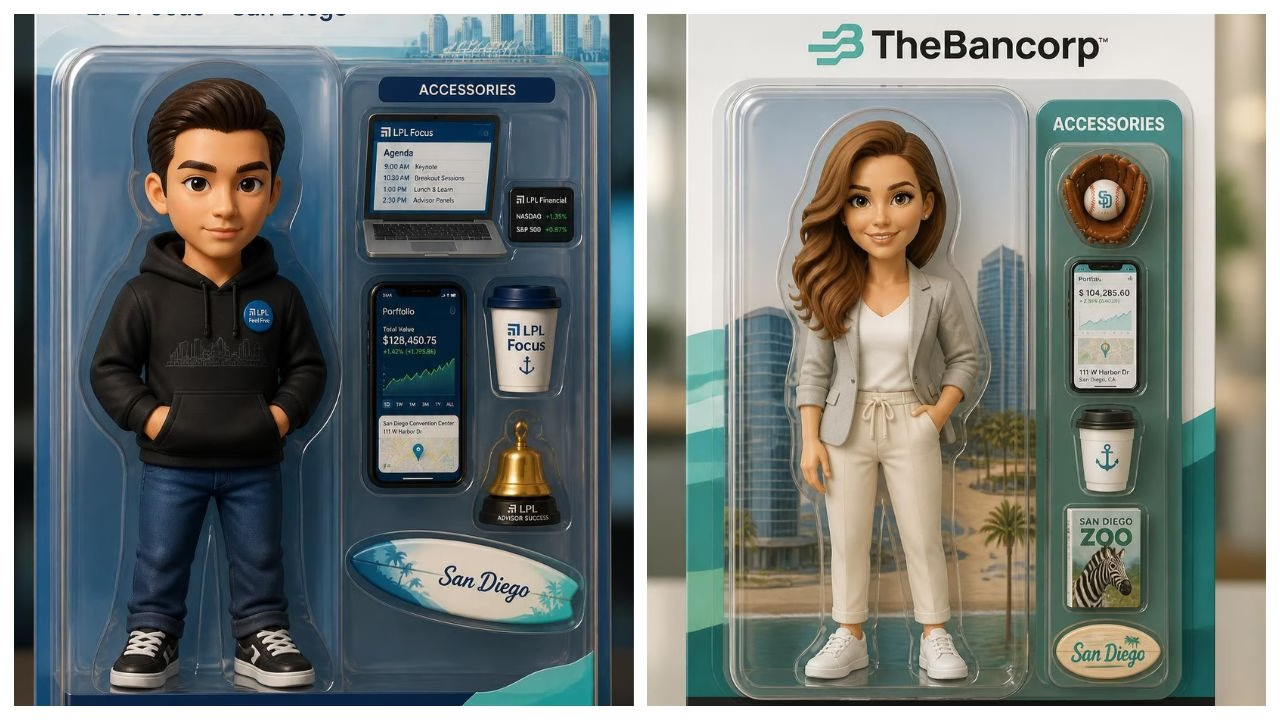
Our system can recognize and transform everyone in the frame, illustrating the type of whole-group processing that event buyers should look for.
In practical terms, a good multi-person result should preserve these details:
• Each guest still looks like themselves rather than a generalized AI face.
• Facial features remain separate, especially where people stand close together.
• The theme looks consistent across the whole image.
• Skin tone, eyewear, facial hair, and hair texture do not disappear without a creative reason.
• Guests near the center and guests at the edges receive similar visual treatment.
A system may detect eight faces but still produce a weak result if three faces are tiny, partly hidden, or poorly lit. Detection alone is not a meaningful quality guarantee.
Group Styling, Face Swaps, And Photo Retrieval Are Different Features
Event technology is often described with broad labels, but several group-related features do very different jobs. You should confirm which one a vendor is actually offering.
Feature | What It Does | What You Should Verify |
|---|---|---|
Group stylization | Applies one visual theme to the full group image | Whether individual likenesses remain recognizable |
Multi-face swap | Replaces or changes several detected faces in one capture | Whether all faces can be processed together |
Face preservation | Maintains each guest’s distinct identity during generation | Whether it works with glasses, facial hair, and varied angles |
Face-based photo retrieval | Groups event photos by the people appearing in them | Whether it is separate from AI generation |
All detected faces can be swapped simultaneously in a group shot. That is useful evidence of multi-face processing, but it does not automatically mean every AI booth handles stylized group portraits or identity preservation in the same way.
The same distinction matters when comparing an AI background changer photo booth. Replacing a background can be easier than rebuilding faces into a detailed fantasy, editorial, or character-based AI theme. If your event concept depends on the faces themselves being transformed, test the actual style rather than assuming all AI effects perform alike.
The Event Workflow Matters As Much As The Model
A polished group-photo experience should feel simple to guests even though several processing steps occur behind the scenes. Guests step into an open-air station, choose a pre-configured AI filter, style, or persona, and pose together. The booth captures the image, uses local GPU power to render the transformation within seconds, and presents the result for approval before printing or digital delivery.
That approval step has real value for group photos. It gives guests a chance to request a retry if one person blinked, a face was obscured, or the generation softened someone’s features. If you are comparing formats, the difference between traditional and AI photo booths is especially relevant here: a traditional booth records the captured scene, while an AI system must also interpret and regenerate it.
What Changes As Group Size Grows
There is no universal face-count standard for AI photo booths. Capacity depends on the software model, camera resolution, lens angle, lighting design, selected effect, and how close guests stand together. A vendor’s stated maximum should be treated as a starting point for testing, not a blanket promise of flawless performance.
Comfortable Capacity Is More Useful Than Maximum Capacity
A useful planning concept is comfortable capacity: the number of people a booth can process consistently under normal event conditions. It is more valuable than a theoretical maximum because it accounts for real guest behavior, not ideal sample images.
Support for groups of two through five and presents it as an add-on. That example shows why buyers should ask both questions: “How many people are technically supported?” and “What group size is included in this specific package?”
Use this planning guide as a practical expectation, not an industry-wide specification:
Group Size | Typical Reliability Outlook | Main Risk | Best Use Case |
|---|---|---|---|
2 people | Usually the easiest group format | Faces may merge if guests press too close together | Couples, co-workers, VIP portraits |
3 to 4 people | Often a strong balance of energy and detail | Mixed heights can leave faces unevenly lit | Small teams and family groups |
5 to 6 people | Needs deliberate spacing and wider framing | Edge faces become smaller and less detailed | Social groups and branded activations |
7 to 8 people | Can work with suitable software and staging | Occlusion, tiny faces, and inconsistent rendering | Planned team shots rather than rapid walk-ups |
More than 8 people | Treat as a special workflow, not an assumption | Individual identity may be hard to preserve | Split into smaller groups or use a standard photo mode |
The quality threshold should be simple: if every person cannot immediately recognize themselves and feel good about sharing the image, the group setup is not ready for live use.
Why Edge Faces And Occlusion Cause Problems
AI processing relies on visible, readable facial information. Faces near the frame edges may be smaller, distorted by lens perspective, or affected by uneven light. A guest’s face can also be partially blocked when people overlap, turn sideways, hold props too high, or stand in a tightly packed row.
Edge faces, lighting, occlusion, hats, glasses, different heights, facial hair, and side angles as conditions operators should review. Those are not minor details. They are the conditions most likely to turn a successful group capture into an awkward retry.
Consider an eight-person photo at a company party. The tallest guests are standing in back, two guests are wearing reflective glasses, one person is partly behind a colleague, and the people at both edges are angled inward. A model may find all eight faces, yet still struggle to preserve sharp eyes, consistent head shape, and distinct facial details. The result may look impressive at a glance but disappoint the people whose faces changed most.
Some Styles Are Harder Than Others
Not every AI theme places the same workload on the system. A light editorial enhancement or background replacement may preserve faces more consistently than a dramatic transformation that changes clothing, hair, setting, and facial styling all at once.
Choose a complex group AI effect when:
• Your activation has enough space for guided posing.
• Guests can wait briefly for rendering and approval.
• The event team can encourage clean framing.
• You have tested the exact selected styles with realistic group sizes.
Choose a lighter transformation or conventional capture when:
• Throughput matters more than elaborate generation.
• Guests will arrive in large, fast-moving clusters.
• The venue has uneven or low light.
• The creative concept includes masks, oversized props, or frequent side profiles.
This is not a reason to avoid AI. It is a reason to match the effect to the operating environment.
How To Build A Group-Ready Event Workflow
You can reduce most group-photo failures before guests arrive. The best approach is to test the full station rather than testing a single sample image on a laptop. Camera position, guest marks, lighting direction, background distance, and the final AI style all affect the outcome.
Run A Structured Pre-Event Test
A useful test matrix includes common group sizes and realistic variations in appearance. Do not test only a perfectly centered, evenly matched group. That tells you little about the guest behavior you will actually receive.
Test Capture | What To Check | Accept Or Adjust? |
|---|---|---|
2 people, centered | Face separation, eye detail, theme consistency | Accept if both likenesses remain clear |
4 people, mixed heights | Lighting across rows, cropped shoulders, spacing | Adjust floor marks or light placement if faces differ sharply |
6 people, full width | Edge-face detail, body placement, background separation | Reframe if edge participants become too small |
8 people, varied poses | Occlusion, glasses, side angles, rendering time | Use only if each face passes review |
Run every test using the actual camera, booth software, lighting, and AI themes selected for the event. A rendering that succeeds in bright office light may behave differently in a ballroom, outdoor tent, or trade show floor.
Give Guests Clear, Fast Pose Direction
Guests do not need a technical lecture. They need one or two easy instructions before the countdown. A host or on-screen prompt can improve output dramatically.
- Keep every face visible to the camera.
- Leave a little space between heads rather than stacking faces tightly.
- Ask taller guests to step back, not crouch directly in front of others.
- Keep eyes toward the lens for the first capture.
- Move large props below chin level.
- If the group is too wide, split it into two images rather than forcing everyone into the frame.
The goal is not stiff posing. It is giving the AI enough visual information to make a trustworthy transformation.
Establish A Fallback Before It Is Needed
A fallback workflow protects guest experience. It prevents an operator from endlessly regenerating an image that will not improve because the original capture has a structural issue, such as a blocked face or poor framing.
Use a simple decision rule:
• Retry once when the capture was almost correct but someone blinked, looked away, or stood too close to another guest.
• Reposition and recapture when faces are at the frame edge, one person is blocked, or lighting is uneven.
• Switch to a lighter AI effect when the detailed theme repeatedly changes identities or produces distorted faces.
• Use a standard photo output when a large group cannot be captured cleanly within a reasonable number of attempts.
This approach aligns with Rock Cam’s recommendation to have a non-AI or lighter-AI fallback when a multi-person result does not pass review. It keeps the line moving and ensures that every group leaves with a usable memory.
For planning conversations, it also helps to understand how an AI photo booth works, including the capture, generation, approval, and delivery stages. Group capacity affects each stage, especially when several guests need to review the result together.
Key Takeaways And Buying Decisions
Key Takeaways
• AI photo booths can process group photos when they include multi-face detection and face-preservation capabilities.
• The most dependable group size is often smaller than the maximum number a product can technically detect.
• A four-person test is not enough. Test two, four, six, and eight people if your event expects larger groups.
• Edge placement, blocked faces, uneven lighting, hats, glasses, and strong side angles are common failure points.
• Face swap, group stylization, and face-based event galleries are separate capabilities that should be evaluated independently.
• A guest approval screen and a clear fallback workflow are operational safeguards, not optional extras.
Questions To Ask Before You Book
A group-capable AI photo booth is worth paying extra for when group interaction is central to the event. That may include a brand activation where colleagues arrive together, a wedding where friend groups want a shared keepsake, or a conference where team photos support a campaign theme.
Ask providers these direct questions:
- What is the maximum supported face count for this specific effect?
- What group size is comfortable under typical event lighting?
- Does the system preserve each individual face, or does it simply transform the image as a whole?
- Can guests approve and retry a result before printing or digital delivery?
- What happens when the AI result fails quality review?
- Is multi-person processing included, or is it a paid feature or add-on?
- Can the team demonstrate the exact theme using a four-person and an eight-person sample?
A trustworthy provider should answer those questions clearly. “It handles groups” is not enough. You need to know what kind of groups, under what conditions, with which effect, and what happens when the image does not meet the standard.
Frequently Asked Questions
Can An AI Photo Booth Handle Group Photos Or Is It Only For Solo Selfies?
A capable AI photo booth can handle group photos, not only solo selfies. It uses facial recognition and image processing to locate several people in one capture and apply a shared AI result. The quality depends on the model, the selected effect, the group’s spacing, and the capture conditions.
How Many People Can Be In One AI Photo Booth Shot?
There is no single number that applies to every platform. Some products support a few people as a defined multi-face option, while others advertise larger group handling. Treat two to four people as the baseline test, then test six and eight people if those sizes matter for your event. Ask for the comfortable capacity, not only the maximum count.
Does Group Size Affect AI Photo Quality?
Yes. As group size grows, each face typically becomes smaller and more likely to sit near the frame edge. More people also increase the chance of overlapping faces, different light levels, and mixed pose angles. A properly staged six-person photo can outperform a poorly arranged four-person photo, but larger groups generally need more intentional setup.
What Happens If Someone Is Blocked Or Standing At The Edge?
The software may fail to preserve that person’s likeness accurately. Edge faces can lose detail, and a partially hidden face may be distorted or missed during generation. The best response is usually to reposition the group and retake the original photo, rather than repeatedly generating from a weak capture.
Does The Booth Keep Each Person’s Face Recognizable?
Some systems are specifically designed to preserve individual faces in group shots. Multi-person processing that preserves individual faces without requiring users to enter the group size. Still, recognition quality should be tested with the actual theme and event lighting.
Can The Booth Handle Different Heights, Glasses, Hats, And Side Angles?
It may, but these conditions increase the chance of an inconsistent result. Different heights can place faces in uneven light, glasses can introduce reflections, hats can obscure facial landmarks, and side angles reveal less facial information. Use simple pose guidance and avoid forcing people into tightly overlapping rows.
Can Guests Receive Group Photos By QR Code, Text, Or Email?
Yes, many event workflows can deliver approved group images through QR code, text, email, or print. The delivery method is separate from the AI’s ability to process the group, but it matters for guest flow. Make sure the booth can provide the final approved image quickly enough for your event’s line volume.
Conclusion
AI photo booths can create memorable group photos, but the strongest results come from realistic planning rather than broad feature claims. Choose a setup that preserves individual faces, define a comfortable group capacity, test the actual creative style, and prepare a fast fallback for difficult captures.
When those pieces are in place, your guests can step in together, choose a theme, approve the result, and leave with a polished group image that feels personal instead of generic.
Luxury AI Photo Booth Rental OC
Elevate your event with the ultimate interactive AI booth in Orange County. Seamlessly blending classic vintage portraiture with modern artificial intelligence.
Reserve Your LoungeNext-Level AI Event Photography
Discover how our top-rated AI photo booth in OC transforms standard event photos into timeless artwork.
AI Red Carpet Experience OC
Give your guests the celebrity treatment with our AI red carpet experience. Instant backdrop shifts, magazine-style retouching, and glamorous digital aesthetic presets delivered in real-time.
AI Cartoon Filter Booth
Transform your attendees into vintage comics, modern animation art, or classic stylized sketches using our custom AI cartoon filter booth in Orange County.
Virtual Try-On Booth
Perfect for brand activations and theme parties, our virtual try-on booth allows guests to digitally swap outfits, period costumes, and accessories in seconds.
Instant AI Portrait Booth
Deliver studio-grade portraits instantly. Our high-speed AI processing renders customized digital portraits that serve as memorable favors for your guests.
Custom AI Photo Booth OC
Tailored specifically to your brand or wedding vision. We design bespoke AI styling filters, backgrounds, and print templates designed uniquely for your event.
Affordable AI Photo Booth
Get premium event technology without breaking the bank. We offer affordable AI photo booth solutions across Orange County and Southern California.
Interactive AI Booth Orange County
Engage your guests like never before. Instead of static photos, our interactive touchscreens guide users through choosing creative AI themes and watching their transformations unfold in real time.
AI Photo Booth Rental Southern California
We provide full-service AI event photography services across Orange County, Los Angeles, and Southern California. Perfect for corporate Galas, weddings, and private celebrations.
The Best AI Photo Booth in Orange County
At Lucky Frog Booth SoCal, we combine vintage aesthetic charm with modern digital innovation. As a premier provider of AI event photography in Orange County, our AI Photo Lounge offers an immersive guest experience that stands out from standard photo booths.
Whether you need a luxury AI photo booth rental in OC for a high-profile corporate function or an affordable AI photo booth for an intimate gathering, our customizable technology guarantees unforgettable memories and instant digital sharing.
To understand the foundational technology behind identifying multiple individuals in a frame, you can review how facial recognition systems function in complex environments.