How Does an AI Photo Booth Work for an Event?
Introduction
How does an AI photo booth work for an event? At its core, it captures a guest photo, sends that image through software that applies a chosen visual treatment, and delivers a finished digital asset that can look like anything from a polished magazine portrait to a branded fantasy scene.
The experience can feel simple to guests: pose, choose a style, receive an image. Behind that short moment sits a coordinated system of camera hardware, a user interface, image processing software, cloud rendering, delivery tools, and often a branded data collection flow.
For decision makers, the real question is not whether AI can make a striking image. It can. The practical question is whether the setup fits your event’s pace, audience, venue, privacy expectations, and marketing goals. A crowded conference hallway needs a different design than a seated gala, a trade show booth, or a wedding reception.
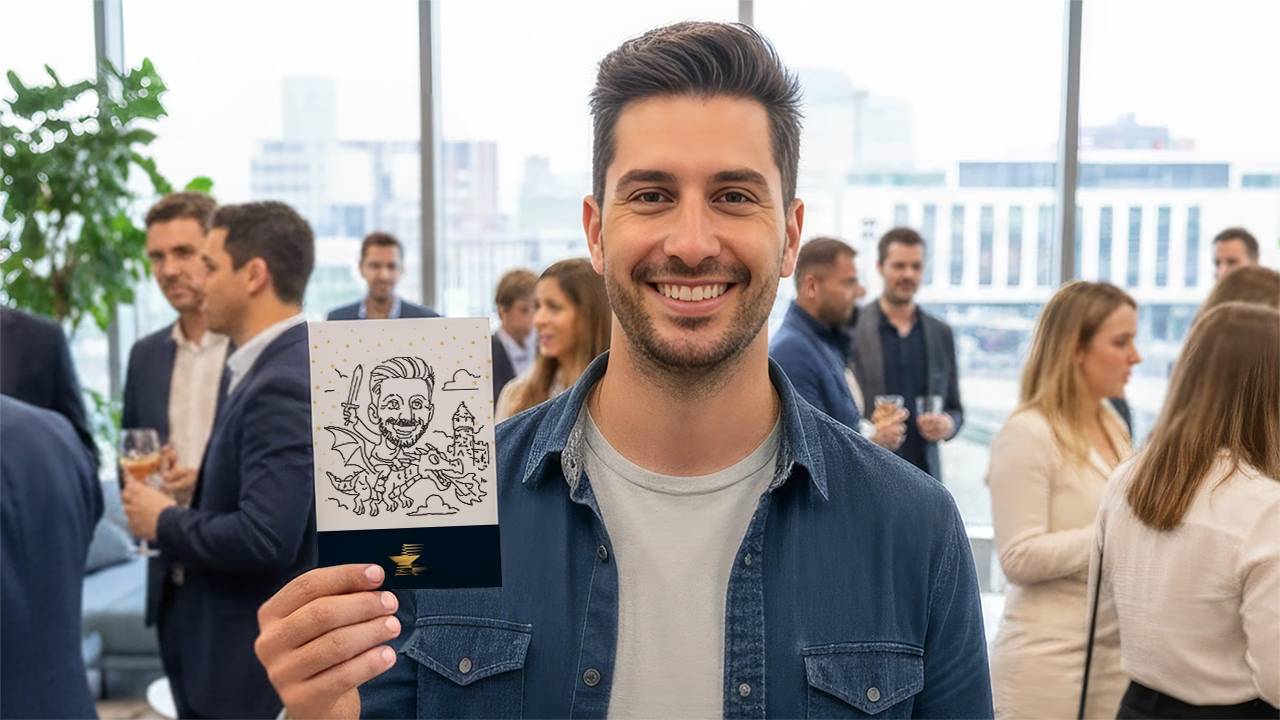
Table Of Contents
TL;DR
An AI photo booth uses a camera or phone to capture a guest image, applies a selected AI style or enhancement through software, then sends the result by QR code, email, text, or gallery. The strongest event setups balance visual quality with queue speed, clear consent, dependable internet, and a backup option for guests who prefer a standard photo.
How The AI Photo Booth Process Works
An AI photo booth is not one fixed product. It is a vendor term that can describe several experiences: a staffed DSLR portrait station, an iPad kiosk, a QR code experience on a guest’s phone, or a browser based campaign that works without a physical booth.
What they share is a workflow that turns an input photo into a transformed image. The transformation may be subtle, such as skin smoothing and a background replacement, or dramatic, such as turning a guest into a cinematic astronaut, retro comic character, or branded campaign persona.
The Guest Journey From Capture To Delivery
Most event experiences follow a similar sequence:
- Start the session. A guest opens a browser link, scans a QR code, approaches a kiosk, or works with an attendant.
- Review the instructions. The screen explains pose guidance, consent language, brand messaging, and available style presets.
- Choose a look. The guest selects from a limited set of approved scenes or visual treatments.
- Capture the image. A phone camera, tablet, webcam, or professional camera takes the source photo.
- Process the image. Software checks framing and faces, prepares the file, and sends it to the rendering system if cloud generation is involved.
- Deliver the result. The guest receives a gallery page, QR retrieval screen, text, email, or optional print.
A browser based format can reduce friction because guests use a device they already understand. For example, guests can start on a browser equipped device, take a photo, and receive branded email delivery in minutes.
That does not mean every event should skip a physical station. A prominent kiosk, backdrop, and lighting setup can make the experience visible across a room. It also gives guests a clear reason to stop, pose, and participate. The best choice depends on whether you need maximum reach, premium portrait quality, a physical brand presence, or all three.
What Happens Under The Hood
The camera captures the original file locally. From there, software typically performs basic image preparation before generation begins. Depending on the platform, that may include face detection, cropping, exposure adjustments, and checks for whether a face is centered and visible.
The system then applies the event’s styling preset. A preset is more than a decorative frame. It usually defines the visual direction the model should follow, such as wardrobe, setting, color palette, lighting mood, and composition. Limiting guests to approved presets helps keep results consistent with a campaign or event theme.
A true AI generated portrait differs from a simple overlay. An overlay places graphics, text, or a logo on top of the original image. A background swap changes the scene behind the person. Likeness preserving generation goes further: it uses the guest’s photo as reference while creating a new portrait in a selected style.
This distinction matters when you set expectations. If your brand needs every attendee’s actual outfit and face to stay untouched, a traditional photo with a branded overlay may be the safer choice. If the goal is an imaginative transformation, AI generation is a better fit, but it can interpret details rather than reproduce every feature exactly.
Many setups use a cloud render pipeline. The booth uploads the input image to remote servers, receives the completed image, and remains ready for the next participant instead of holding the camera idle.
Timing, Throughput, And The Reality Of “Instant”
“Instant” can mean several things. A basic photo enhancement or background treatment may appear almost immediately. A more complex likeness preserving portrait can take longer because the system must upload, render, and return a new file.
A smooth solo session may be closer to 90 seconds when the line is short and choices are limited.
For planning, treat total session time as more important than render time alone. A guest can spend 20 seconds deciding between eight styles, 15 seconds retaking a photo, and another minute entering contact details. The AI may be fast, yet the queue still grows.
Use this operating model:
Event Condition | Best Flow | Why It Helps | Watch For |
|---|---|---|---|
High traffic trade show | QR start with phone delivery | Keeps guests from waiting at one screen | Signage must explain the steps quickly |
Premium gala or launch | DSLR, studio lighting, attendant | Produces more controlled portraits | Needs a dedicated footprint and staffing |
Internal event with lower volume | iPad kiosk | Familiar, compact, and easy to supervise | Guests may need help with delivery fields |
Large distributed audience | Browser based experience | Works beyond one physical location | Results depend on each guest’s phone and connection |
A practical way to protect throughput is to separate capture from delivery. Let the guest pose at the booth, then retrieve the result on a phone while the next person starts. A clear “scan here for your finished image” screen can prevent a crowd from forming around the camera.
Choosing The Right Booth Architecture
The technology should support the event objective, not become the objective. If you need polished lead capture, choose a flow with a visible consent step and a reliable export process. If your audience wants a memorable keepsake, prioritize lighting, composition, and print options. If line speed matters most, keep style choices tightly curated.
For a broader overview before choosing a format, this What is an AI photo booth? resource explains the core concept and common uses.
QR Code, Kiosk, And Browser Based Formats
Each format moves the same core workflow into a different place. QR code systems put more of the journey on the guest’s device. Kiosks centralize the journey at a branded station. Browser based formats may be accessible from anywhere but rely more heavily on individual devices and stable connectivity.
Format | Capture Device | Space And Staffing | Best Use Case | Main Trade Off |
|---|---|---|---|---|
QR code activation | Guest phone | Minimal physical footprint; an attendant is still useful at busy events | High volume campaigns and distributed participation | Less control over phone cameras and guest lighting |
iPad station | Tablet camera or connected camera | Roughly 4 to 6 feet of standing room | Compact activations and smaller venues | Can become a single point of congestion |
DSLR booth | Professional camera and lighting | Dedicated capture zone plus operator | High quality portraits and premium brand moments | More setup and production coordination |
Browser based experience | Guest phone or computer | No booth required, but strong instructions matter | Hybrid, remote, or wide reach campaigns | Less theatrical presence at the venue |
Dreamwave AI notes that QR and iPad configurations are both possible, that an iPad station can need about four to six feet of space, and that normal indoor lighting may work while a ring light or softbox can improve the final look.
Choose QR first when you expect foot traffic spikes and can accept some variation in source photos. Choose a controlled camera station when the images will be used in a client facing gallery, printed at large size, or tied closely to a luxury visual identity.
Branding Is Designed Before Guests Arrive
Customization works best when it starts with a design brief rather than a vague request to “make it look on brand.” The booth provider or campaign team generally needs approved colors, logo rules, visual references, sample copy, and a list of elements that must not appear.
A strong branded experience may include:
• A custom welcome screen and instructions
• Three to five visual presets built around a campaign concept
• A branded overlay or discreet end card
• Event specific email, text, or gallery pages
• Optional questions tied to a consent based lead capture form
• A live gallery that can be moderated before public display
AI styles should be constrained. Giving guests a few clear choices, such as “Future Founder,” “Coastal Editorial,” and “Neon Product Lab,” creates a coherent gallery. Offering a free text box where every guest writes any concept they want can produce inconsistent results and may create moderation issues.
For planners evaluating the operational side, an AI photo booth rental planning guide can help frame questions about space, guest volume, custom design, and staffing before event day.
Privacy, Consent, And Lead Capture Need Separate Decisions
A photo is personal data, and an AI transformed portrait can make the data conversation more sensitive. Do not bury the choice inside a rushed screen. A guest should be able to understand what information is collected, why it is collected, whether marketing follow up is optional, and how the image may be used.
Keep these choices distinct:
- Participation consent: Permission to take and process the photo.
- Marketing opt in: Permission to receive future promotional messages.
- Public display permission: Permission to include the image in a live gallery, social post, or recap content.
- Data retention policy: A clear decision about how long the provider and organizer retain images and contact information.
Fair warning: a lead form that blocks the image until someone agrees to marketing can frustrate guests and weaken trust. A better pattern is to make the photo delivery available after essential processing consent, then present promotional opt in as a separate, voluntary choice.
You should also request a recovery plan. If a guest mistypes an email address, can an attendant resend the image? If the network slows down, can the system queue uploads and send results later? If an image is unsuitable for a public gallery, can it be removed or moderated before display? These are small workflow choices that shape whether the technology feels polished or confusing.
Key Takeaways
Make The Experience Easy Before Making It Elaborate
An AI photo booth succeeds when guests understand the next action without a long explanation. Put the style choices on one screen, use visual pose examples, and make the QR retrieval point obvious. If your audience includes people who may not want to use their phones, keep an attendant available and provide a kiosk delivery option.
Offer a non AI alternative whenever possible. Guests may prefer a regular photo because they want a familiar likeness, do not want their image transformed, or simply want a fast keepsake. A standard capture with the same branded overlay gives them an inclusive option without removing the AI attraction for everyone else.
Protect Image Quality And Event Reliability
The most common quality problems are predictable:
• Faces hidden by hands, hats, sunglasses, masks, or hair
• Dim lighting that creates soft or noisy source images
• Group shots with people standing at different distances from the camera
• Guests stepping outside the marked capture zone
• Weak venue Wi Fi or a connection that drops during uploads
Use a simple visual test before doors open. Stand where guests will stand, take a solo shot and a group shot, test delivery to a phone, and confirm that the branded result displays correctly. If the venue connection is uncertain, discuss a dedicated connection, cellular backup, or a delayed delivery plan.
For a deeper look at the broader format, AI photo lounge and event photography explores how an immersive photo area can combine AI visuals with a more deliberate event photography experience.
Frequently Asked Questions
Common Questions About AI Photo Booths
What Is The Difference Between A Traditional Photo Booth And An AI Photo Booth?
A traditional photo booth captures a photo and may add a frame, filter, or print layout. An AI photo booth can also capture a standard photo, but it adds image generation or automated processing that can change the background, aesthetic, wardrobe interpretation, or overall scene. Traditional booths are usually more predictable. AI booths offer more transformation and novelty, but results depend more on photo quality, selected style, and the rendering system.
Can Guests Opt Out Of The AI Filter And Get A Regular Picture?
Yes, if the event workflow is designed to allow it. This is a smart option for mixed audiences. You can offer “Original Portrait” beside the AI styles, or send both the original and transformed image. Confirm this feature in advance because not every platform or package handles the standard capture and generated output in the same way.
How Long Does It Take For The AI Image To Transform And Generate?
It depends on the effect and the event connection. Simple automated adjustments can be nearly immediate, while a generated portrait may take from several seconds to a few minutes. Plan around the full guest session rather than only render time. A streamlined setup with limited styles and phone based retrieval usually moves faster than a station where every guest waits for delivery at the kiosk.
Can You Customize AI Photo Booth Filters For An Event Theme Or Corporate Brand?
Yes. You can often customize style presets, visual scenes, screen graphics, overlays, gallery pages, and delivery messages. The strongest results come from providing visual references and narrowing the creative direction. For example, a technology launch may use polished chrome, cyan lighting, and product shaped graphics, while a wedding may use editorial florals and warm film tones.
Do Guests Need To Download An App?
Usually, no. Many systems run in a mobile browser after a guest scans a QR code. That reduces setup friction, especially for short interactions at conferences and public activations. Still, test the journey on both iPhone and Android devices before the event, including the delivery page and any email or text confirmation.
Does An AI Photo Booth Work For Group Photos?
It can, but group output is less predictable than a single portrait. The software must detect and interpret several faces at once, and results improve when everyone is well lit, looking toward the camera, and standing on a similar plane. For large groups, a traditional group photo with a branded overlay may be the more dependable backup.
Can An AI Photo Booth Print Photos Too?
Some setups can pair digital AI delivery with on site prints. The trade off is timing. If prints must wait for generated artwork, guests may stand around longer. A practical compromise is to offer an immediate print of the original photo and deliver the AI version digitally, or use a separate pickup point for completed prints.
Conclusion
An AI photo booth works best as a carefully designed event system, not just a novelty camera. You need a clear guest flow, an appropriate capture format, constrained brand styles, dependable delivery, and respectful consent choices.
If you are planning a corporate activation, private celebration, or high visibility event, start by defining what matters most: portrait quality, guest volume, lead capture, social sharing, or a premium physical installation. Then build the booth around that priority. The result is more likely to feel effortless for guests and useful for your event team long after the last image is delivered.

DrawMatic AI Drawing Robots
Blend vintage artistry with modern intelligence. Our robotic sketch artists draw live, bespoke 4×6 portraits of your guests in under 60 seconds.
Book Your Event ExperienceThe DrawMatic Experience
Live Robotic Sketches
An autonomous pen-plotting robot transforms high-resolution attendee photos into tangible hand-drawn art on standard 4×6 keepsakes.
Speed & High Throughput
Generating each completed drawing in 40 to 60 seconds, our bots keep lines moving rapidly at high-capacity conferences and trade shows.
Small Mini Bodies Mode
Transform guests beyond standard headshots into full-body caricatures—from superheroes and vintage icons to custom corporate mascots.
Generative Artist Suite
Leveraging cloud-based AI, offer guests customized prompts, style transfers, and deep art rendering tailored directly to your event theme.
Brand Activations
Incorporate company logos, custom messaging, and overlay templates directly onto every physical and digital keepsake created.
On-Site Supervision
Every setup includes a dedicated “Drawing Bot Butler” to manage hardware, assist guests, and ensure smooth activation delivery.
AI & Photo Booth Services
To understand the underlying technology behind these transformations, you can explore the principles of generative artificial intelligence for further reading.
To understand the underlying technology behind these transformations, you can explore the fundamentals of generative artificial intelligence for further reading.