Generative AI Photo Experience Long Beach Guide
Introduction
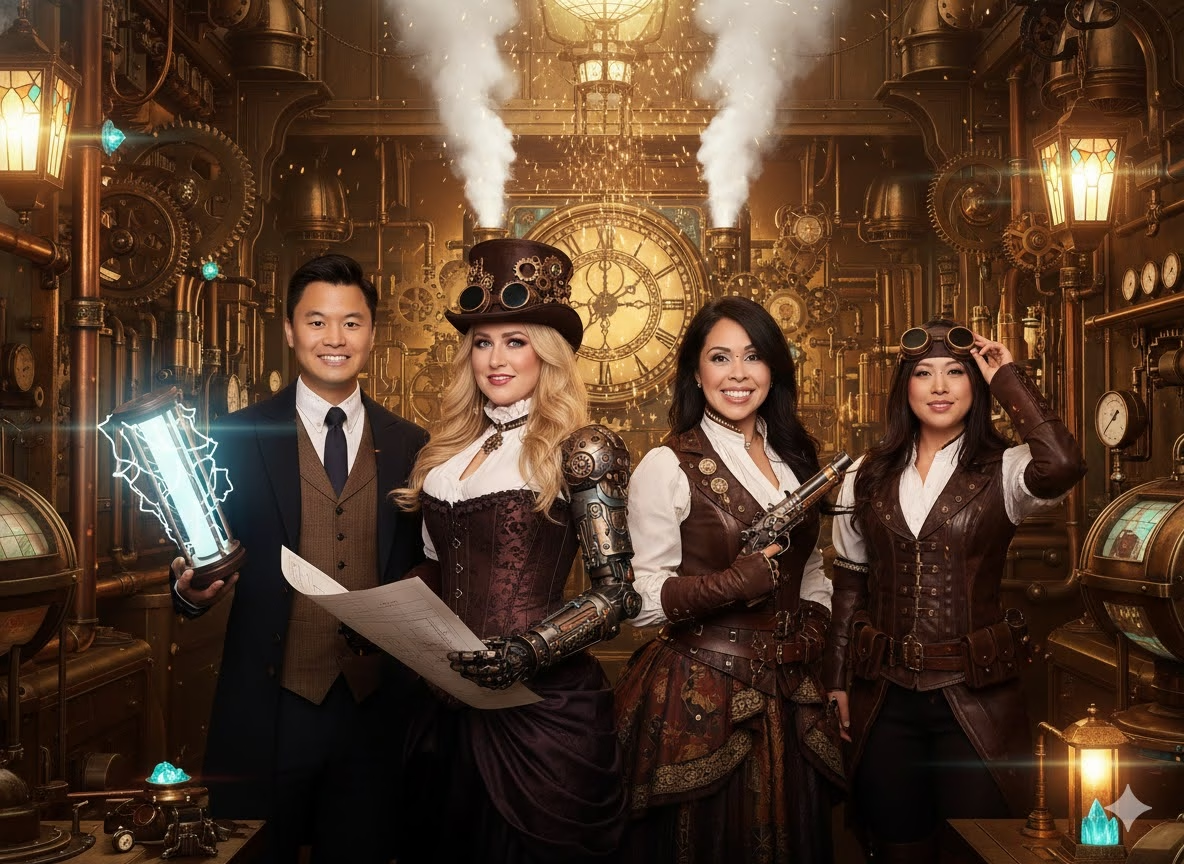
A generative AI photo experience Long Beach event is not simply a standard photo booth with a digital filter. It is a live, guided photo activation where guests are photographed, then transformed into new visual worlds through image synthesis. A group can become vintage movie stars, comic characters, futuristic explorers, polished corporate portraits, or coastal scenes inspired by the city’s shoreline and architecture.

For decision makers, the real question is not whether AI images look interesting. It is whether the experience fits your audience, venue, event timeline, brand standards, and privacy expectations. Done well, it creates a memorable guest interaction and a useful stream of shareable content. Done poorly, it can create long lines, inconsistent imagery, and confusion about what happens to guest photos.
Table Of Contents
TL;DR
A generative AI photo experience can give a Long Beach event a distinctive visual identity, but success depends on more than the software. Choose a controlled style system, confirm space and staffing, plan for privacy and accessibility, and build a delivery method that works even if venue connectivity is uneven.
What A Generative AI Photo Experience Actually Is
A generative AI photo experience combines photography with machine learning systems that create or substantially transform an image. The booth captures a guest’s face or group photo, then a model interprets selected instructions, reference settings, and style controls to synthesize a new image. Unlike a fixed color filter, the system may alter wardrobe, scenery, lighting mood, illustration technique, or apparent setting.
In practical event terms, this is usually a controlled creative service, not an open ended art generator. Guests may choose from a curated menu of looks, while an attendant or prompt specialist keeps images consistent with the event theme. That control matters. A brand launch does not want every guest typing unrelated requests that produce unpredictable results, and a wedding host generally does not want a line stalled by lengthy prompt experiments.

AI Photo Booth, Portrait Station, And Headshot Booth
These labels are often used interchangeably, but they solve different event problems.
Format | Best Use | Guest Interaction | Typical Output Goal | When To Avoid It |
|---|---|---|---|---|
AI photo booth | Parties, receptions, general events | Quick pose, select a look, receive image | Entertaining keepsake | When every image must follow strict brand rules |
AI portrait station | Premium activations and lounges | More guided capture and style selection | Editorial or artistic portrait | When floor space and dwell time are limited |
AI headshot booth | Conferences and recruiting events | Controlled pose and professional styling | Usable profile image | When the event needs playful group participation |
Face swap experience | Theme parties and promotional moments | Guest face placed into a designed scene | Novelty image | When consent terms are unclear or audience comfort is uncertain |
AI beach photo generator | Coastal campaigns and social content | Upload or capture a clear image, choose scene | Beach themed variations | When the objective is authentic event documentation |
An AI photo booth is usually the broadest option. It favors speed and group participation. An AI portrait station is more deliberate, with studio lighting, a more curated interface, and sometimes a lounge like setting. A headshot booth narrows the creative range in favor of a polished and repeatable professional result.
For a deeper rental planning framework, consult the AI Photo Booth Rental Long Beach Guide. The key is to select the format based on the action you want guests to take after the photo. Should they print it, post it, enter a lead form, remember a wedding theme, or use it as a professional profile image?
What Happens Under The Hood
The event workflow may look simple, but several systems are working together:
- Capture: A camera or booth captures the guest under controlled lighting. Clear facial features and even illumination improve the result.
- Selection: The guest or attendant chooses a preset, prompt guided theme, branded background, or portrait type.
- Generation: Neural networks analyze the captured image and generate a new composition based on the chosen visual rules.
- Review: The system or attendant checks that the output is recognizable, suitable, and properly branded.
- Delivery: The image is printed, accessed through a QR code, sent digitally, or displayed in an event gallery.
The difference between presets and freeform prompts is important. Presets are pretested recipes: for example, “art deco Long Beach night,” “coastal watercolor,” or “Hollywood glam.” Freeform prompting gives guests more freedom but can slow throughput and make brand consistency harder to maintain.
An immersive, prompt based event experience rather than a routine photo capture. That distinction is useful when comparing proposals. Ask whether guests select a preset, write their own instructions, or receive staff guidance. Each model creates a different pace and level of creative control.
Why Long Beach Works As A Visual Starting Point
Long Beach offers a natural contrast between coastal light and city texture. A campaign can draw from waterfront color, marina atmosphere, art deco references, convention energy, or the graphic geometry of downtown without pretending the AI image is documentary photography.
This is where creative direction beats a long menu of random styles. Consider a company hosting an evening reception near the waterfront. Instead of offering 30 unrelated choices, it could offer four cohesive visual routes:
• A cinematic coastal night portrait with deep teal and warm neon accents
• A sun washed editorial beach scene with clean brand color accents
• A retro travel poster style that uses simplified city and shoreline motifs
• A polished modern portrait with a subtle custom background for professional sharing
The result feels designed rather than generic. Guests still get variety, while your event maintains a recognizable visual thread.
Choosing The Right AI Photo Format
A generative experience is worth the investment when the transformation itself supports the event objective. If the goal is simply to document people at a casual gathering, a traditional booth may be faster and less complex. If the goal is to make attendees pause, interact, share, and associate a visual memory with your event, AI can justify the added production effort.
Match The Format To The Event Objective
A wedding, a campus gathering, and a brand activation can all use similar technology, but they should not use the same operating plan.
Event Type | Strongest AI Approach | Decision Criteria | Watch For |
|---|---|---|---|
Wedding | Curated romantic or editorial presets | Couple wants a distinct keepsake and guests have time to participate | Avoid themes that distract from the wedding aesthetic |
Corporate event | Branded portrait lounge or headshot format | Need measurable engagement, lead capture, or employer branding | Confirm brand approvals before the event |
Product activation | Prompt guided branded transformation | Product story can become a visual world | Keep choice menus short to protect throughput |
Holiday party | Playful group styles and print options | Entertainment matters more than strict image utility | Plan for high demand during peak arrival periods |
Campus event | Accessible presets and social delivery | Diverse audience and rapid sharing are priorities | Avoid requiring every guest to download an app |
For corporate teams, ask what success looks like in numbers. It may be total sessions, QR scans, opt in contacts, print pickups, social shares, or time spent in the activation zone. The answer should shape the interface. A booth designed for a six second capture is different from a branded station designed to collect approved contact information.
The Smarter Event Activation Guide for AI Photo Booths in Long Beach can help align the activation format with guest flow and campaign goals rather than treating the booth as standalone entertainment.
Choose Styles That Can Survive Real Event Conditions
Style menus should be exciting, but they also need to work across different skin tones, glasses, hairstyles, formalwear, group sizes, and lighting conditions. A dramatic concept may look wonderful in a sample image yet perform inconsistently on a group of six standing shoulder to shoulder.
A reasonable request is to see representative output from the intended setup, especially if your event has a narrow brand palette or formal dress code. Ask whether the style has been tested for:
• Individual portraits and groups
• Guests wearing glasses, hats, or reflective clothing
• Different heights and mobility needs
• Dark and light garments against the capture background
• Printed output as well as phone viewing
Styles including retro, vintage, comic book, oil painting, and watercolor, while also listing a minimum 10 by 16 foot setup footprint for guests, equipment, attendants, and prompt support. That space requirement illustrates why a beautiful concept needs a physical production plan.
Coastal Themes Without Misleading Guests
Beach inspired AI portraits can be useful for Long Beach events, especially when an indoor venue lacks a view or weather makes outdoor photography impractical. But label them as creative compositions, not real location photographs. This is especially relevant for branded content, where clarity matters.
Prompt based generation from uploaded JPG or PNG images and positions the results for social sharing on channels such as Instagram Reels, TikTok, and YouTube Shorts. For an event, that suggests a practical use: offer an imaginative coastal image as a shareable companion to the real event photo, not a replacement for it.
Planning For Venue Operations, Privacy, And Access
The most impressive image synthesis system can still fail as an event experience if there is no room for the line, poor lighting, unclear consent language, or a delivery bottleneck. Treat the installation like a small production zone.
Build A Realistic Setup Plan
Start with a site walk or a detailed venue diagram. The booth footprint is only part of the requirement. You also need circulation space for waiting guests, an attendant position, power access, a print station if included, and a clear exit path for people who have finished.
Ask the venue and provider these operational questions:
- Where will the experience sit without blocking registration, bars, fire exits, or accessible routes?
- Is there reliable nearby power, and who supplies extension protection or cable covers?
- Can lighting be controlled, or will sunlight, glass reflections, and dark corners affect capture quality?
- Is there an indoor backup position if an outdoor setup faces wind, heat, or rain?
- What is the expected generation time per guest or group during peak traffic?
Fair warning: “instant” is a guest facing description, not a guarantee that every image appears at the same speed. Processing can vary with group size, image complexity, selected style, and technical conditions. A sensible recovery plan includes a limited preset menu, a visible queue, an attendant who can redirect guests, and a fallback capture mode if generation slows.
Some providers advertise offline capable workflows. For example, Lucky Frog’s Long Beach AI photo booth service states that it offers AI powered filters, custom AI backgrounds, instant prints, QR code sharing, and operation without Wi Fi. Even then, clarify what “no Wi Fi” covers. Capture and local printing may work without venue internet, while gallery delivery, email sending, reporting, or live social posting may require connectivity later.

Treat Privacy As A Design Requirement
Guest images can be personal data, especially when they are used to create facial transformations or tied to names, email addresses, or marketing permissions. Your consent workflow should be obvious before capture, not buried after a QR scan.
At minimum, decide and communicate:
• Whether images are stored, and for how long
• Whether images are processed locally, transmitted to a service, or both
• Whether the provider or client can use images for marketing
• Whether guests can decline promotional use while still receiving their image
• Who receives access to galleries, analytics, and contact data
For example, a public consumer activation may use a short on screen notice plus a separate optional marketing checkbox. A private wedding may need only a courteous notice that guests are being photographed and a clear way to request removal. Do not assume the same consent language works for both.
Make The Experience Accessible
Accessibility should affect the physical and digital design. Position the camera so guests who use wheelchairs can participate without being treated as an exception. Avoid relying on tiny on screen instructions alone. Offer staff assistance without requiring guests to explain personal needs in public.
Useful design choices include a seated capture option, readable screen contrast, short written directions, verbal guidance on request, and enough open space for mobility devices. If music or ambient noise is high, visual instructions become more important. If the experience requires QR delivery, provide an alternate method for guests who do not use smartphones.
Use Creative Tools Beyond The Event Booth
The event booth is not the only way to explore generative image making in Long Beach. California State University Long Beach’s AI Technology resources identify Adobe Firefly as an AI powered image generator with style, color, and composition controls, and describe licensed access to generative tools for eligible students, faculty, and staff. That is a useful local reminder that event output and personal creative experimentation are related but different activities.
For a brand event, use the booth’s controlled system. For concept development, campaign mood boards, or internal creative exploration, image generation tools can help shape an art direction before guests arrive. The Generative AI Photo Booths for Events overview offers nearby Southern California context for thinking about these formats across different event settings.
Key Takeaways
Make The Technology Serve The Moment
• Choose an AI photo booth when you need a fast, social, participatory attraction.
• Choose a portrait or headshot station when image quality, brand control, or professional usefulness matters more than speed.
• Limit style choices to a tested set that reflects your event theme and works for groups.
• Confirm the actual space plan, including queueing, attendants, power, and accessible circulation.
• Separate photo delivery consent from marketing consent whenever possible.
• Ask what happens if connectivity drops, generation slows, or a guest dislikes the first result.
Conclusion
A generative AI photo experience can turn a simple event portrait into a small piece of digital art shaped by your theme, your guests, and Long Beach’s visual character. The strongest version is not the one with the most effects. It is the one that makes participation easy, keeps visual quality consistent, respects guest choice, and fits the room as naturally as the rest of the event.
Before booking, define the guest outcome you want, request a concrete setup plan, and make privacy and accessibility part of the brief from the start.

Frequently Asked Questions
What Is A Generative AI Photo Experience In Long Beach?
It is a live event photo activation that captures guests and uses generative AI to create transformed portraits, scenes, or themed artwork. In Long Beach, it is typically booked for weddings, corporate events, brand activations, parties, and social content moments rather than as a general purpose image editing service.
Is This The Same As An AI Photo Booth?
Often, yes, but “generative AI photo experience” is broader. An AI photo booth usually emphasizes fast guest capture and delivery. A portrait lounge, AI headshot booth, or face swap activation may use the same underlying technology while offering a more specialized result or workflow.
How Long Does An AI Photo Take To Generate?
There is no universal time because results depend on the image, selected style, equipment, and workflow. A well planned event should use tested presets and staff support to keep the line moving. Ask the provider for expected guest throughput, not only an individual image generation estimate.
Can Guests Receive Both Prints And Digital Images?
Many event setups can provide both, but confirm this in the proposal. Prints give guests a physical takeaway, while QR code delivery supports later sharing. Also ask whether digital galleries remain available after the event and whether downloading requires an email address or other data collection.
How Much Space Does An AI Photo Booth Need?
It depends on the equipment and guest flow, but do not plan around the booth cabinet alone. One provider lists a minimum 10 by 16 foot footprint for AI booth equipment, guests, attendants, and prompt support. Your venue may need more room for a queue, printing, and accessible access.
Does An AI Photo Booth Need Wi Fi At The Venue?
Not always. Some systems can capture, generate, or print without venue Wi Fi. However, QR delivery, email delivery, cloud galleries, reporting, and live posting may have different connectivity requirements. Ask which functions continue during an internet interruption and which are completed later.
Are Guest Photos Private?
Privacy depends on the provider’s policies and the event’s consent design. Before booking, request clear answers about storage duration, image processing, marketing use, gallery access, deletion requests, and whether guests can opt out of promotional use without losing their personal image.
Is Generative AI Better Than A Standard Photo Booth?
It is better when the transformation is central to your event concept and guests will enjoy spending a little more time choosing a style. A standard booth may be better for very high volume events, documentary style keepsakes, or situations where every guest needs a predictable photo immediately.