AI Photo Booth Rental for Anaheim Corporate Events: What to Expect
Anaheim corporate events move on a schedule. A conference lets out at the Anaheim Convention Center, guests drive ten minutes to a hotel ballroom, and suddenly a few hundred people need something to do between the welcome drink and the keynote. An AI photo booth solves that gap because it gives every guest a finished, shareable image in less time than it takes to finish a plate of appetizers.
We are a Los Angeles and Orange County photo booth company, and our Anaheim work is planned out of that local base. Being nearby changes the practical side of a booking: travel windows, setup access, parking for the crew, and the reality that most Anaheim venues want vendors in and out on a specific clock. This article walks through what an AI booth actually does, what your guests walk away with, and the questions worth asking before you sign anything.
What an AI Photo Booth Is
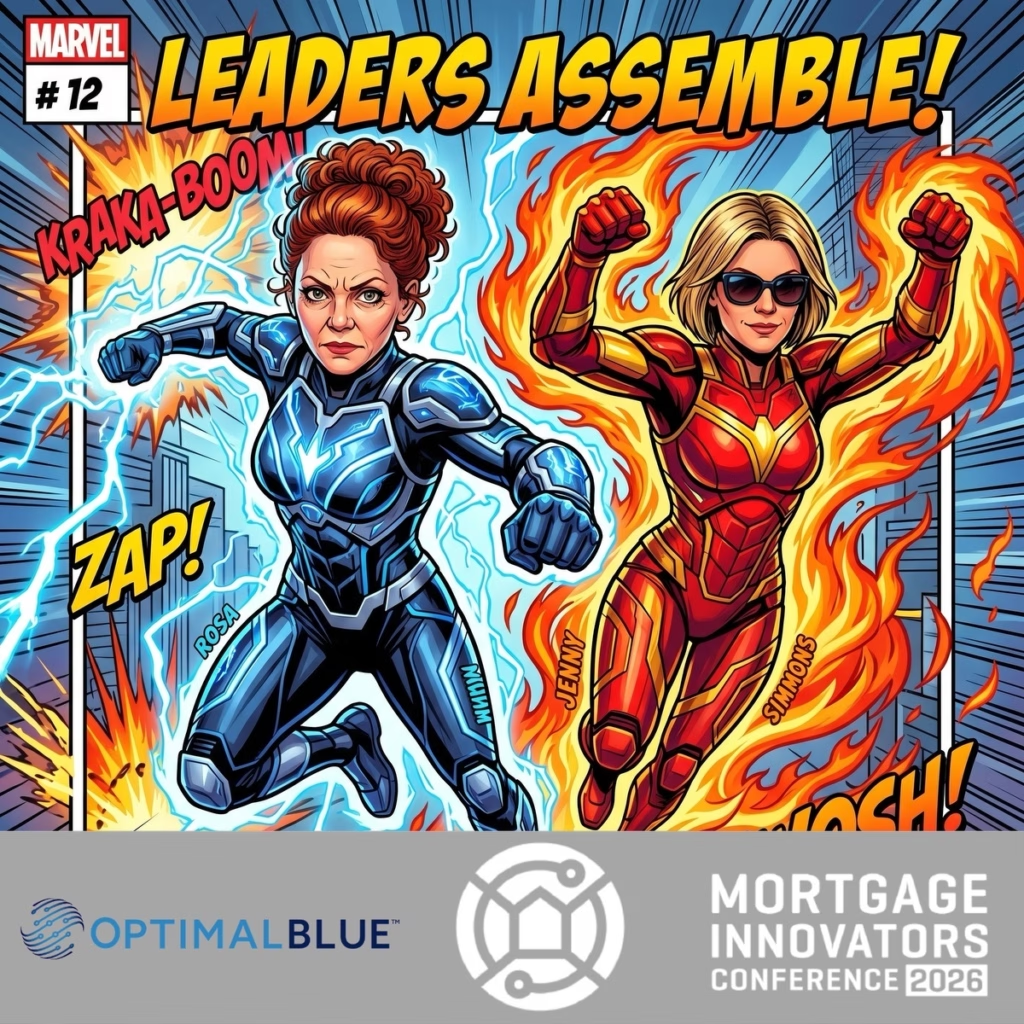
An AI photo booth is a camera station that transforms each guest portrait in real time into a themed image, such as a magazine cover or a movie poster. The guest still stands in front of a camera and poses, but the output is not the photo as it was taken. The system rebuilds the portrait inside a scene, an art style, or a layout that matches your event.
The technology behind that is a mix of real time background removal, face detection, and rendering that turns a raw capture into a styled image in seconds. Modern AI booths layer in custom branding for logos, hashtags, and event themes, so the finished image looks like it came from your company rather than from a filter app.
Common AI portrait formats we build for corporate clients include:
-
A guest recast as a magazine cover subject, with cover lines and a masthead style layout. These read well when the event is a product launch or a milestone anniversary.
-
A group shot turned into a retro movie poster, complete with title lettering. Teams use this one for awards nights because the whole department fits in the frame.
-
A clean, brand-forward portrait that drops the guest into a solid color field with your logo and event name in the corner. This is the version that tends to get posted to LinkedIn the next morning.
How the Experience Works, Step by Step
Step one: the guest picks a look
Guests choose from a themed menu on the booth screen. The menu is where your customization lives. A sales kickoff might offer four looks tied to the year’s campaign, while a holiday party might lean on playful, seasonal styles.
Step two: the photo is captured
An attendant or the on-screen prompt positions the guest, and the camera takes the shot. This part takes a few seconds. A single subject or a small group both work, and larger groups can be accommodated depending on the booth configuration you book.
Step three: the AI renders the image
Processing happens in seconds. The guest watches a themed portrait appear on screen almost immediately, which is a big part of the appeal. There is no waiting for someone to spend five minutes editing in a back room.
Step four: the image is delivered
Depending on the package, guests receive a digital file, a print, or both. Sharing usually happens through a QR code, text message, or email input on the booth screen, and a custom print template can carry your logo and event branding onto the physical copy.
How an AI Booth Differs from a Traditional Photo Booth
What you are comparing | Traditional booth | AI booth |
|---|---|---|
What the guest gets | Photo strips or standard prints from the actual capture | A themed, AI-rendered portrait such as a magazine cover or movie poster |
Variety of output | One look per session, repeated for each guest | Multiple looks per event, with the guest choosing a style |
Group size | Varies by configuration. Published specs for open air booths list up to 15 people in a single photo | Varies by configuration. Group shots work, and themed group renders are popular |
Branding | Custom print templates and step and repeat style backdrops | Custom print templates plus logo, hashtag, and theme integration inside the render itself |
Best fit | High volume, quick turnaround, classic keepsake | Brand moments, hero content, and events where the image itself is part of the marketing |
How Companies Customize the Experience
Every booth we send out is configured for the event in front of it. The customization conversation usually covers four areas: the theme, the visuals, the branding, and the deliverables.
-
Themes. Looks built around your campaign, industry, or celebration. A financial services team and a gaming studio should not have the same menu.
-
Visuals. Personalized backdrops, green screen options, themed props, and LED elements that connect the booth to the room’s decor instead of sitting apart from it.
-
Branding. Logos, hashtags, and event names worked into the render, the print template, and the on-screen interface.
-
Deliverables. Digital sharing, prints, or both, along with any batch image delivery for your internal communications team.
In practice, theme selection is a short conversation that saves a lot of rework. I ask three questions before recommending anything: what should a guest feel when they see the image, where will the image be posted, and who signs off on brand standards. If the answer to the third question is a legal or marketing review, we build the render so the logo placement is fixed and the guest does not control the brand elements. If the images are purely for fun and internal sharing, the guest gets more freedom over style and color. That one answer changes the whole configuration, and it is much easier to settle before the event than during setup.
What an Anaheim Planner Should Prepare
Most of the friction at a corporate event comes from logistics, not technology. Work through this list with your venue contact and your vendor before the run of show is final.
-
Space. Booth footprints vary widely by configuration. Ask for the exact footprint of the unit you are renting and confirm it against your floor plan, with a little extra room for a queue.
-
Power. Confirm what the booth draws and whether a standard wall outlet nearby is enough or a dedicated circuit is needed. Ballrooms often have outlets in inconvenient places.
-
Connectivity. Ask whether the AI booth needs internet to render and share, and how the vendor plans to provide it. That might be venue Wi-Fi, a dedicated hotspot, or a cellular connection, and it should be settled in advance because convention center networks can be congested or restricted.
-
Setup access. Ask your venue when vendors can load in, which entrance to use, and whether freight elevator access is required. If your event is at the Anaheim Convention Center or a nearby hotel, those rules are usually set by the facility, not the planner.
-
Schedule placement. Decide where the booth sits in the run of show. The strongest windows are during reception, before the program starts, and after the formal portion ends, when guests are free to move around.
-
Staffing and paperwork. Confirm the vendor is on the venue’s approved supplier list if one exists, and ask what insurance documentation your venue requires.
One thing worth noting on the venue side: organizers should confirm any current rules or requirements directly with the Anaheim Convention Center or the property they are using, since vendor access policies are set by the facility and can change.
What Affects the Rental Price
AI booth pricing is not a flat rate. For reference, published rates in the Anaheim market start at $1,995 for a three-hour AI booth rental that includes an on-site attendant and a custom print template. Treat that as a market benchmark rather than a quote, because the final number depends on your specifics.
The factors that move a quote up or down:
-
Rental hours, including whether you want the booth running for the full event or only during reception.
-
The level of customization, from a single branded frame to a fully built set of themed looks.
-
Printing, since unlimited prints and paper stock cost more than digital sharing alone.
-
Staffing, including the number of attendants needed for your guest count and event length.
-
Travel, parking, and load-in time for a crew coming from outside the immediate area.
-
Add-ons such as a second station, extra props, or a dedicated viewing screen.
Whatever the final figure is, your quote should spell out the number of hours, whether an attendant is included, what the custom template or branding covers, what the backdrop situation is, whether prints are included, setup and teardown windows, travel and parking charges, how the image files are delivered, and what retention terms apply afterward.
Guest Photos, Privacy, and Retention
Retention practices differ significantly between vendors, so this deserves a direct question rather than an assumption. Ask how long images are stored, who has access to the gallery, whether images are used for the vendor’s own marketing, and whether you can request deletion after a set period. Get the answer in writing as part of your agreement, and note that consent practices for guest photos also depend on how you notify attendees at your event. If your company has its own data handling requirements, share them before the event so the vendor can confirm what is possible.
Booking Timeline and Availability
Anaheim hosts a heavy volume of conferences, trade shows, and corporate gatherings, so peak dates and popular seasons fill early. If your event lands during a busy convention week, or on a weekend in a month when the area is hosting several large shows, start the conversation as soon as your date and venue are locked. Earlier is always better when a specific booth style matters to your plan.
Choosing a Booth for Your Anaheim Event
To move from research to a booking, gather four details first: your event date, your venue, a realistic guest count, and the theme or brand direction you have in mind. With those in hand, a vendor can give you an accurate recommendation instead of a generic package. You can explore our Anaheim AI photo booth rental options to see how our configurations are put together for corporate events, then compare them against the questions in this guide.
Planning a corporate event in Anaheim? Share your event date, venue, estimated guest count, and theme to request availability and a tailored quote.
Frequently Asked Questions About AI Photo Booth Rentals in Anaheim
How is Lucky Frog’s AI photo booth different from a traditional photo booth?
Our AI photo booth transforms a guest’s photo into a themed portrait rather than simply delivering the original photograph. For your Anaheim corporate event, Lucky Frog Photo Marketing can help you choose an image style that fits your celebration or brand. A traditional booth focuses on classic photos; an AI booth adds a creative transformation to the guest experience.
Do guests receive digital images, prints, or both?
Digital images, prints, and delivery options depend on the Lucky Frog package you select. Tell us how you want guests to receive their portraits, and we’ll confirm the available options and what your quote includes. If you want printed keepsakes, we’ll also clarify print quantities and branding options before you book.
Is an attendant included with Lucky Frog’s AI photo booth rental?
We’ll confirm staffing in your AI photo booth quote, including whether an attendant is included and what support is provided during your event. Share your guest count and event schedule so we can recommend an appropriate setup for guest assistance and booth operation.
Does your AI photo booth require venue Wi-Fi?
Connectivity requirements depend on the AI booth experience you choose. Before your Anaheim event, we’ll explain the connection needed for image processing and delivery and coordinate the requirements with you. If venue Wi-Fi is limited or unavailable, let us know during planning so we can discuss suitable options.
How far ahead should we book an AI photo booth in Anaheim?
Contact Lucky Frog as soon as you have your event date and venue, especially if you need custom AI themes or branded images. Early planning gives us more time to confirm availability and review your creative requirements. Planning on a shorter timeline? Send us your date so we can check what’s possible.
Is Lucky Frog Photo Marketing based in Anaheim?
Yes. Lucky Frog Photo Marketing is based in Anaheim and serves events throughout Orange County and Los Angeles. When you inquire, share your venue, event hours, and any setup requirements so we can plan the logistics for your location.
How do I get a quote for an Anaheim AI photo booth rental?
Send us your event date, Anaheim venue, estimated guest count, rental hours, and any theme or branding ideas. Let us know whether you want digital images, printed keepsakes, or both. We’ll use those details to recommend an experience and prepare a tailored quote.
Explore our Anaheim AI photo booth rental options or contact Lucky Frog to check availability.